A car key cover usually does not affect a key fob signal when it is made from a non-metal material and fits the fob correctly. Silicone, leather, TPU, and similar materials generally sit around the outside of the key without blocking its normal operation. However, covers with metal plates, thick shielding materials, or poorly designed structures may interfere with signal transmission or keyless detection in some situations.
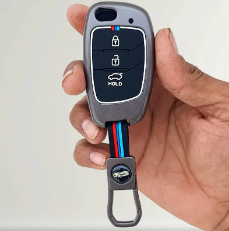
If your key fob works normally without the cover but becomes unreliable after fitting it, removing the cover is a simple first test.
How Does a Key Fob Signal Work?
A modern car key fob communicates wirelessly with the vehicle. Depending on the vehicle, it may use radio-frequency communication for locking and unlocking, while a keyless-entry or push-button-start system may use additional signals to detect the fob’s location.
The fob sends and receives low-power wireless signals. The vehicle must detect those signals correctly before it can respond.
Several things can affect this communication, including:
- A weak fob battery
- Strong nearby radio interference
- Metal objects close to the fob
- Electronic devices
- Physical shielding
- The vehicle’s receiver or antenna
- The design of the key fob itself
Vehicle manufacturers specifically warn that metal objects and electronic devices can interfere with keyless systems. Ford, for example, notes that a remote may not work correctly when it is too close to metal objects or electronic devices.
Can a Car Key Cover Block the Signal?
Yes, it can in certain designs, but this is not normally a problem with ordinary protective covers.
The material and construction matter more than the fact that the product is a cover.
Silicone and TPU Covers
Flexible silicone and TPU covers are commonly used because they are lightweight and non-metallic. A properly fitted cover made from these materials generally does not create the same shielding effect as a metal enclosure.
For everyday use, the important factors are:
- Correct key-fob compatibility
- Proper button alignment
- Openings for antennas or other features where required
- No unnecessary metal components
- A secure but not overly bulky fit
Leather Covers
Leather itself is not a metal shield. A leather key case normally has little reason to affect wireless communication simply because it surrounds the fob.
However, some leather cases use metal clips, decorative plates, chains, or other hardware. These components should be considered separately.
Metal Covers
Metal deserves more attention. Conductive materials can shield or alter radio-frequency signals depending on their design, position, coverage, and the frequencies involved.
This does not mean every metal accessory will stop a key fob from working. It means that a fully enclosed or heavily shielded design can create a greater possibility of reduced communication.
Some vehicle documentation specifically warns that a metallic object touching or covering a keyless remote can make operation unstable.
Does a Key Cover Affect Keyless Entry?
It potentially can, especially if your vehicle uses passive keyless entry.
With passive entry, you may not need to press a button. The vehicle detects the key nearby and communicates with it automatically.
This makes signal conditions slightly different from simply pressing the lock button.
If a cover creates significant shielding, the vehicle may have more difficulty detecting the fob. Volvo explains that electromagnetic fields and screening can interfere with keyless functions and advises keeping the remote away from metal objects.
For this reason, people with smart keys should pay particular attention to the construction of a cover.
Signs Your Key Cover May Be Affecting the Signal
A signal problem may not always be obvious. Look for changes that began immediately after installing the cover.
Possible signs include:
| What you notice | What it may indicate |
| Shorter locking range | Signal may be partially obstructed |
| Unlock button works only nearby | Possible shielding or interference |
| Passive entry becomes inconsistent | Fob detection may be affected |
| Push-button start sometimes says key not detected | Possible detection issue |
| Everything works after removing the cover | Cover may be contributing |
| Problems continue without the cover | Look for another cause |
These symptoms do not prove that the cover is responsible. A weak battery, electronic interference, or a vehicle-side issue can produce similar behavior.
How to Test Your Key Fob Cover
You do not need special equipment to perform a basic comparison.
1. Test the fob with the cover
Stand at your normal distance from the vehicle and use the lock and unlock buttons.
Notice whether the response is normal.
2. Remove the cover
Take the fob out and repeat the same test from approximately the same position.
3. Test keyless entry
If your car has passive entry, try locking and unlocking the vehicle with the cover installed and then removed.
4. Check the starting system
For a push-button vehicle, check whether the car consistently recognizes the fob.
5. Test the spare key
If you have another compatible fob, compare its performance. If both keys have the same problem, the cover may not be the main cause.
This simple process helps separate a cover-related issue from a battery, interference, or vehicle problem.
Other Things That Can Interfere With a Key Fob
A key cover is only one possible factor.
Your key fob can also experience problems when it is close to certain objects or devices. Ford and Honda owner information both identify nearby metal objects, phones, electronic devices, and radio interference as possible causes of keyless-entry problems.
Common things to check include:
- Smartphone placed directly beside the fob
- Multiple electronic access devices
- RFID cards or tags
- Metal key rings
- Other vehicle keys
- Wireless equipment
- Low fob battery
- Thick or specialized signal-blocking materials
A Nissan technical bulletin also identifies nearby RFID devices, multiple keys, phones, chargers, and other transmitting devices as possible sources of interference.
How to Choose a Key Cover Without Signal Problems
If signal performance is important, choose a cover based on fit and construction rather than appearance alone.
Look for the exact fob match
A cover should be designed for your specific key shape. Check the vehicle make, model, year, button layout, and key design before purchasing.
Choose non-metal materials
Silicone, TPU, and many leather designs are practical options when you want protection without adding a conductive enclosure around the fob.
Check the construction
Avoid unnecessary metal plates or fully enclosed shielding designs if your priority is maximum wireless accessibility.
Keep buttons accessible
The buttons should press easily without requiring excessive force.
Do not block emergency features
If your fob contains a mechanical emergency key, release button, charging area, or other opening, make sure the cover does not prevent access.
What If the Signal Is Still Weak?
If removing the cover does not improve performance, look beyond the cover.
Start with the fob battery. A weak battery can reduce reliability and may cause warning messages or inconsistent operation.
Next, test the key in a different location. If it works normally elsewhere, environmental interference may be involved.
Also keep the fob away from phones, metal objects, and other electronics while testing.
If the problem continues with multiple keys, check the vehicle owner’s manual or contact a qualified automotive professional.
Can silicone affect a car key signal?
A normal silicone cover is unlikely to block the signal because silicone is non-metallic. Correct fit and the overall cover design still matter.
Does a leather key cover block signals?
Leather itself generally does not act like a metal shield. However, metal hardware attached to the case may have an effect in some situations.
Can a metal key cover reduce signal range?
It can. Conductive material may shield wireless signals depending on its design and coverage.
Why does my key fob work better without its cover?
The cover may be adding physical shielding or placing metal components close to the fob. Remove it and compare performance.
Can a key cover stop keyless entry?
A poorly designed or heavily shielding cover could interfere with keyless detection. Test the vehicle with and without the cover.
Does a key fob battery affect signal range?
Yes. A weak battery can cause reduced or inconsistent operation, so check the battery before blaming the cover.
FAQs
1. Should I remove my key cover if the signal is weak?
Yes. Remove it temporarily and test the fob again. If performance returns to normal, consider using a different cover.
2. Is a silicone car key cover safe for keyless entry?
Generally, a properly fitted silicone cover should not cause a signal problem. However, vehicle and fob designs differ.
3. Are metal key covers a bad choice?
Not necessarily, but metal construction deserves more attention because conductive materials can provide shielding under certain conditions.
4. Why does my car say “key not detected”?
Possible causes include a weak fob battery, interference, nearby metal objects, or a problem with the vehicle’s keyless system.
5. Can a phone interfere with a key fob?
Yes. Some vehicle manufacturers specifically warn that phones and other electronic devices can interfere with keyless operation when they are very close to the fob.
6. Should a key cover fit tightly?
It should fit securely without putting pressure on buttons or blocking important openings. An exact-fit design is preferable to a loose universal case.
7. How can I check whether my cover causes interference?
Test the fob at the same distance with the cover installed and removed. Compare locking, unlocking, passive entry, and starting performance.
Final Takeaway
A car key cover does not automatically interfere with a key fob signal. Most simple, properly fitted non-metal covers should allow normal everyday operation. The greater concern is a design that uses substantial metal, shielding material, or other components that sit around the fob’s signal path.
If you notice reduced range or inconsistent keyless entry after installing a cover, remove it and repeat the test. If the problem disappears, choose a simpler cover with the correct fit and minimal metal.
Remember that signal problems can also come from the fob battery, nearby electronics, metal objects, or the vehicle itself. Checking these factors one by one is the easiest way to find the actual cause.